
TO Exits
TO Exits launches for Toronto riders who want to board for their exit
TO Exits brings the idea behind MTL Exits to Toronto. Pick your subway exit and see where to board on TTC Lines 1, 2 and 4.


TO Exits brings exit-based boarding guidance to the Toronto subway.
You know which subway stop you need. But when the train pulls in, which car should you get on? On November 13, the TTC gave riders a reminder that where you stand matters. During late-night work from November 16 to 18, trains at Pioneer Village and Sheppard West could use the opposite side from usual. The notice pointed to a detail a station name alone can’t tell you. TTC’s November 13 service notice
That detail is the idea behind TO Exits, our new app for Toronto’s subway, now available for iPhone and iPad. It brings the approach we built for Montréal’s MTL Exits to TTC Lines 1, 2 and 4. Pick your departure and destination stations, choose an exit where options are available, and the app suggests which part of the train to board. That gives you a chance to do some of the walking on the platform before the train arrives. TO Exits website · MTL Exits
What the arrow tells you
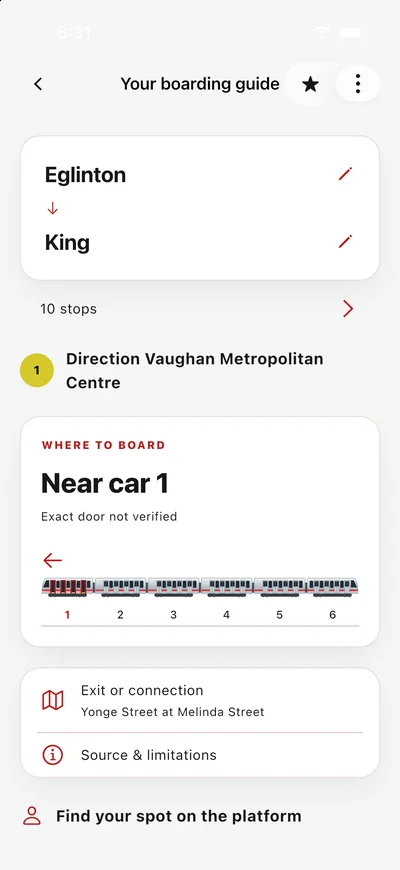
A change we made before launch helps you read the train diagram while you’re standing on the platform. Where station records establish which way the train normally moves as you face the tracks, the guide shows a left or right arrow. That helps you tell which end of the train to look toward. The arrow can appear even when the app only has enough information to suggest a car area.
Take a Line 1 ride from Eglinton to King. If you select the Yonge Street exit at Melinda Street, the guide suggests boarding near car 1 and shows a left-pointing arrow for the train’s usual movement as you face the tracks. The same screen tells you the exact door is unverified. Open Source & limitations to see what the recommendation is based on. Where platform walking guidance is available, you can also select where you entered the platform to get an approximate walking direction, step count and countdown. Canadian App Store listing
The late-night work at Pioneer Village and Sheppard West is a good example of when to look up from the diagram. TO Exits uses station information for normal service. For temporary boarding changes, closures and elevator outages, check the TTC’s advisories and follow station signs and announcements. On a regular trip, the installed app’s core station search, route planning and boarding guidance work offline, so you can check your exit again underground. TTC service advisories · TO Exits website
Try it on your next subway ride. Get TO Exits for iPhone or iPad.