
MTL Exits
From Métro to REM: A More Connected Week for MTL Exits
MTL Exits now plans Métro and REM journeys, with easier route reversal, clearer boarding guidance, and Montréal-area address search.


End of Sprint Review · October 5–11, 2026
Some Montréal trips start on the Métro and finish on REM. Knowing where to change trains is one part of the journey. Knowing which car and door to aim for can make the next step clearer.
This week, we brought those connected journeys into MTL Exits. During October 5–11, 2026, we added REM stations and mixed Métro–REM trips, made route controls easier to reach, and improved boarding guidance. Version 1.5.4 is now available on web, Android, and iOS.
The release also includes address search and illustrated Help work completed in September. Here is what you can use today, and where guidance still needs further verification.
Plan across Métro and REM
MTL Exits now includes 23 REM stations, branch browsing, and network maps alongside the Métro. You can choose stations from either network and plan a journey that combines them, including trips using the Deux-Montagnes and Anse-à-l’Orme branches.
Choose your departure in From and your destination in To, as usual. The route displays the relevant train directions and the car and door guidance available for each part of the trip. Distinct blue Métro and white-and-green REM illustrations help you read the journey.
In the example below, the trip starts at Jean-Talon toward Snowdon, then continues on REM from Édouard-Montpetit. You can see the two train sections together before setting off.
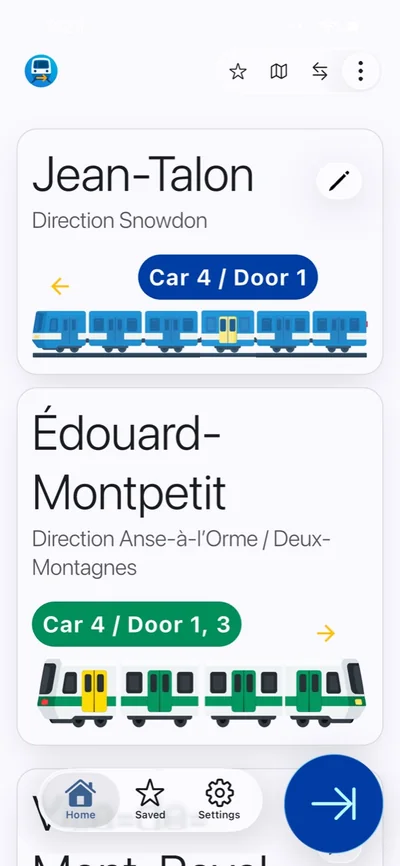
Guidance is available where recorded station information supports it. Some REM boarding positions remain unavailable. Métro boarding positions for REM connections at Édouard-Montpetit, McGill, and Bonaventure are provisional estimates awaiting field verification. Use station signs to confirm the connection when travelling.
Turn the trip around and reach maps more easily
When it is time to head back, tap the two opposing arrows in the top bar. The new reverse-route control swaps your departure and destination and recalculates the journey, so you can check the guidance for the return direction without entering both stations again.
The map control is also back on the route screen, giving direct access to the route’s stations and connecting lines. Map pickers beside the From and To fields make station browsing easier to reach while choosing or editing a trip.
There are fewer unnecessary choices along the way. When a direct journey is available, the app selects it automatically. Mixed journeys also start on the appropriate departure platform without an extra initial platform-change instruction.
Find your boarding position
The train illustrations now highlight recommended boarding cars more clearly. Entry guidance also skips an extra menu when there is only one usable choice.
Tap a route’s train card to open its entry guidance. If a picker appears, choose the recorded position that corresponds to where you entered the platform. The numbered markers identify entry positions, while the highlighted train shows the recommended boarding car.
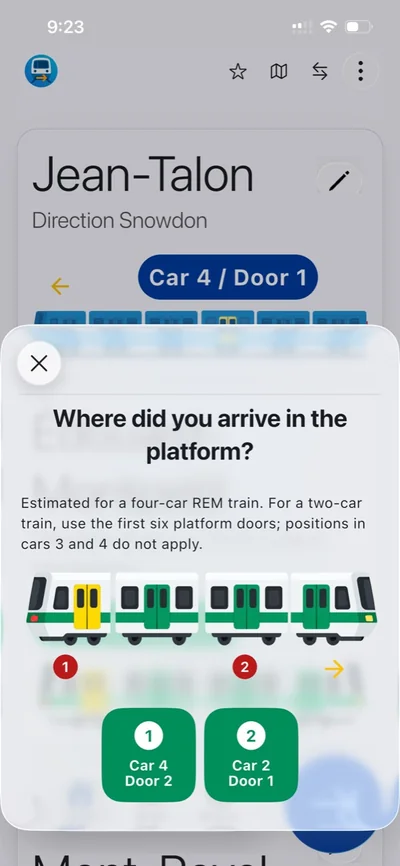
Where the necessary data is available, the next screen gives an estimated walking direction, number of steps, and walking time. Tap Start walking to use the countdown.
This week’s update revised Métro walking estimates to account for train dimensions and door counts, and enabled REM walking guidance for supported entry positions. These are timed estimates, not live position tracking. REM estimates assume a four-car train; positions in cars 3 and 4 do not apply to a two-car train. The app does not detect the formation arriving at the platform.
Earlier improvements now included in this release
If you know an address but are unsure which station to choose, From and To can search Montréal-area addresses online. Selecting a suggestion chooses the nearest station in the app’s station list.
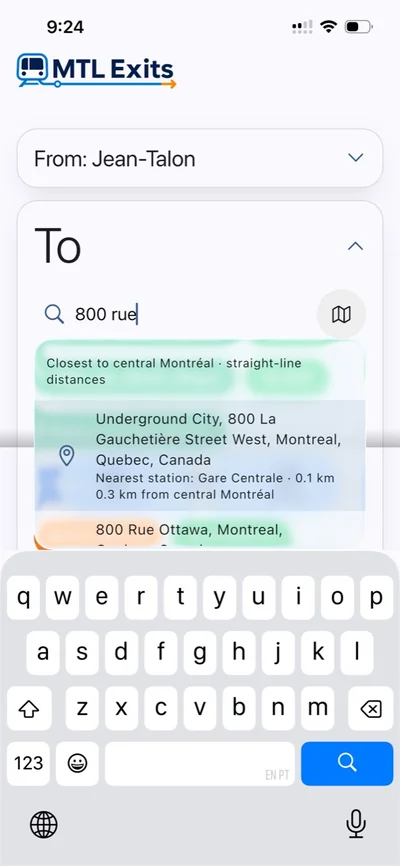
Address search was completed on September 26 and is included in this week’s release. This week’s refinements keep results within the Montréal region, including Laval, Longueuil, Brossard, and nearby REM communities, and fix address searches that failed on mobile. The feature selects a station by straight-line distance; it does not provide an outdoor walking itinerary.
The release also includes September’s illustrated English and French Help guide and more prominent Home and Work station shortcuts. Help explains how to choose stations and street exits, read car and door recommendations, and find a boarding position. This week, we corrected the proportions of its illustrations.
On mobile, core station, route, and exit guidance uses bundled data and works offline after installation. Address search needs an internet connection.
A more dependable start
Alongside the journey changes, we fixed a problem that could prevent the installed Android app from opening, including on Chromebooks. On mobile, the app and the on-screen walking countdown can also continue if notification setup fails. Completion notifications still depend on successful setup and permission.
On mobile, the blue splash now stays visible until the app is ready, without a second loading screen. On web, the welcome video plays again, making the introduction available to people learning the app’s flow.
Check service conditions before you travel
On October 8, weather disrupted REM services, as Journal Métro reported that day. That is a useful reminder when planning a connected trip: station and boarding guidance is only part of the information you need.
MTL Exits provides guidance from bundled station data. For current delays, closures, and service conditions, check the REM’s official service-status page before travelling. The app does not show live arrivals or disruption alerts.
Keep your place when the window changes
After the October 6 web release, we completed additional layout changes for resized windows and folding displays. They preserve route selections, search drafts, open sheets, scrolling, and map zoom as the screen’s available space changes.
These changes reached the web app on October 11. Their inclusion in the released mobile apps has not been confirmed. Broader foldable support remains in progress and needs further device validation and layout work.
Try it on your next connected trip
Version 1.5.4 reached web and Android on October 6, followed by iOS on October 10. You can open MTL Exits on the web, or find the mobile app on Google Play and the App Store.
Pick your next Métro–REM journey, check the guidance available for your route, and use the reverse button when it is time to return. The aim remains the same: help you understand where to board before the train arrives.